{A}Table of Contents
Caching stores copies of frequently accessed data in a fast layer (usually memory) to reduce latency and backend load. But every cache introduces a fundamental trade-off: speed vs. consistency. The faster we serve data, the higher the risk of serving outdated information.
The challenge isn't avoiding inconsistency - it's managing it systematically.
Too often, engineers fixate on cache hit rates (percentage of requests served from cache). While hit rates matter, they only tell half the story. Ignoring data freshness can silently cause bugs, lost revenue, or compliance violations.
What you'll learn:
- How to measure and budget for cache inconsistency
- Practical patterns for different consistency requirements
- Real-world debugging and operational strategies
We'll start with fundamentals, but this isn't a beginner's guide. We assume you've worked with caching tools like Redis or Memcached, but focus on principles over tool-specific features.
Why invest time in this? In high-scale applications, caching is essential, but mismanaged caches cause subtle, hard-to-debug failures. To make these concepts concrete, we will include a hands-on simulation that lets you experiment, observe, and internalize caching behaviour under realistic conditions.
By the end, we will have a principled approach to designing, evaluating, and optimizing caches - moving beyond raw hit rates to build systems that are both fast and reliable.
The Basics of Caching
Core Concept
A cache is a fast, temporary store (usually memory) placed between your application and a slower backing store (database, API, or file system).
Application → Cache → Database
             ↑ Fast   ↑ Slow but authoritative
Goal: Reduce latency and backend load by keeping hot data close to the application. Challenge: Cached data can become stale (outdated) when the backing store changes.
Cache-Aside Pattern
The most common pattern - your application explicitly manages the cache:
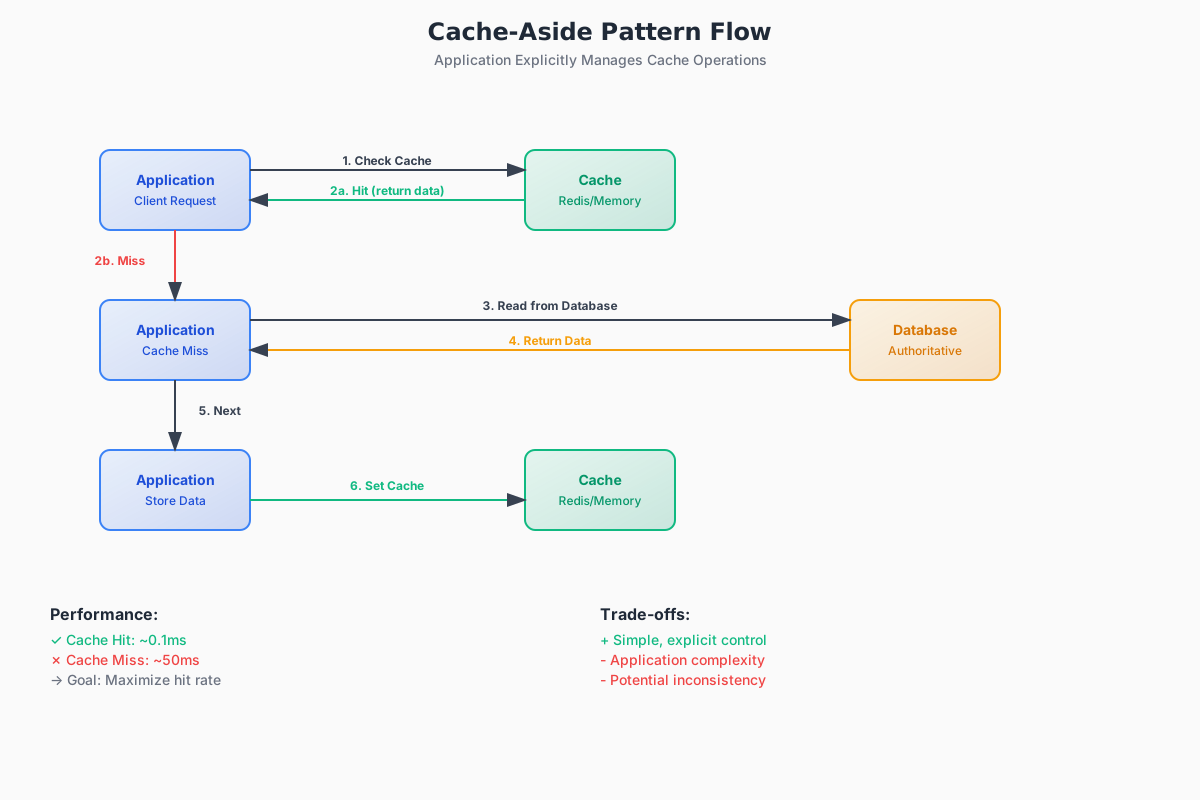 Zoom
Zoom
1def get_user(user_id):
2    # 1. Check cache first
3    user = cache.get(f"user:{user_id}")
4    if user:
5        return user  # Cache hit
6
7    # 2. Cache miss - read from database
8    user = database.get_user(user_id)
9
10    # 3. Populate cache for next time
11    cache.set(f"user:{user_id}", user, ttl=300)  # 5 min TTL
12 return user1def get_user(user_id):
2 # 1. Check cache first
3 user = cache.get(f"user:{user_id}")
4 if user:
5 return user # Cache hit
6
7 # 2. Cache miss - read from database
8 user = database.get_user(user_id)
9
10 # 3. Populate cache for next time
11 cache.set(f"user:{user_id}", user, ttl=300) # 5 min TTL
12 return userPros: Simple, explicit control over what gets cached
Cons: Application handles cache logic, potential for inconsistency
Caching Patterns Deep Dive
Understanding different caching patterns is crucial for choosing the right approach for your use case. Each pattern has distinct trade-offs in terms of consistency, performance, and complexity.
Read-Through
The cache automatically handles data loading on cache misses.
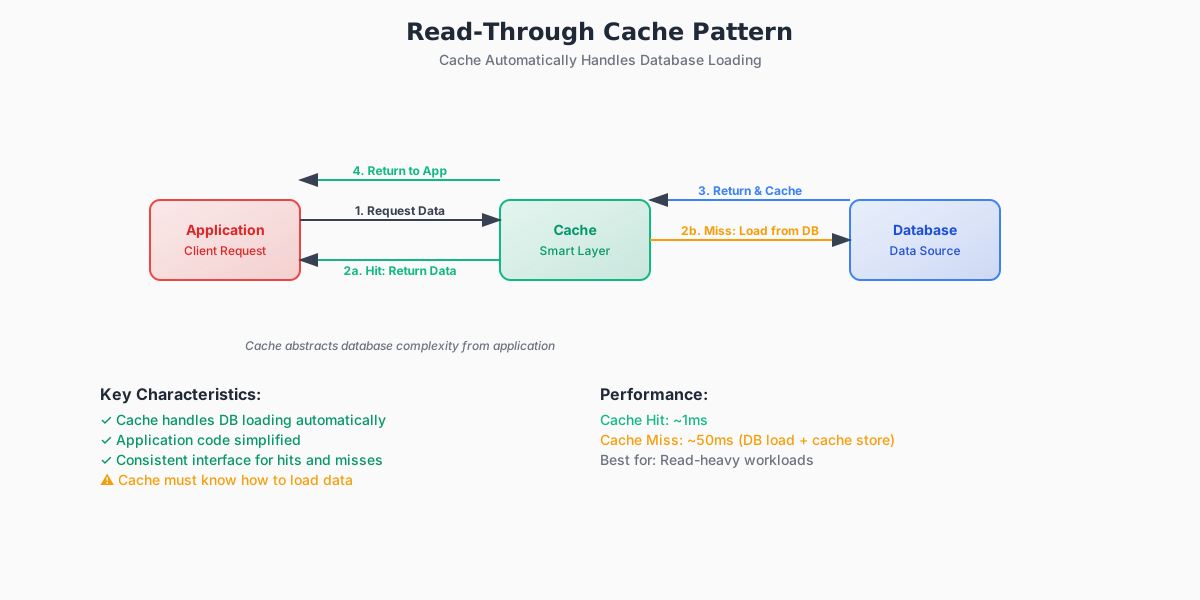 Zoom
Zoom
1def get_user_profile(user_id):
2    # Cache handles DB lookup automatically
3    return read_through_cache.get(f"profile:{user_id}")
4
5class ReadThroughCache:
6    def get(self, key):
7        value = self._cache.get(key)
8        if value is None:
9            # Cache automatically loads from database
10            value = self._load_from_database(key)
11            self._cache.set(key, value, ttl=300)
12 return value1def get_user_profile(user_id):
2 # Cache handles DB lookup automatically
3 return read_through_cache.get(f"profile:{user_id}")
4
5class ReadThroughCache:
6 def get(self, key):
7 value = self._cache.get(key)
8 if value is None:
9 # Cache automatically loads from database
10 value = self._load_from_database(key)
11 self._cache.set(key, value, ttl=300)
12 return valuePros: Simplifies application code, ensures cache always has fresh data on first access
Cons: Adds latency on cache misses, cache layer needs database access
Write-Aside (Cache-Aside for Writes)
Application explicitly manages cache updates after database writes.
1def update_user_profile(user_id, profile_data):
2    # 1. Write to database first (authoritative source)
3    database.update_user(user_id, profile_data)
4
5    # 2. Then update or invalidate cache
6    cache_key = f"profile:{user_id}"
7
8    # Option A: Update cache with new data
9    cache.set(cache_key, profile_data, ttl=300)
10
11    # Option B: Invalidate cache (safer for consistency)
12    # cache.delete(cache_key)
13
14def get_user_profile(user_id):
15    # Standard cache-aside read pattern
16    cache_key = f"profile:{user_id}"
17    profile = cache.get(cache_key)
18
19    if profile is None:
20        # Cache miss - load from database
21        profile = database.get_user(user_id)
22        cache.set(cache_key, profile, ttl=300)
23
24 return profile1def update_user_profile(user_id, profile_data):
2 # 1. Write to database first (authoritative source)
3 database.update_user(user_id, profile_data)
4
5 # 2. Then update or invalidate cache
6 cache_key = f"profile:{user_id}"
7
8 # Option A: Update cache with new data
9 cache.set(cache_key, profile_data, ttl=300)
10
11 # Option B: Invalidate cache (safer for consistency)
12 # cache.delete(cache_key)
13
14def get_user_profile(user_id):
15 # Standard cache-aside read pattern
16 cache_key = f"profile:{user_id}"
17 profile = cache.get(cache_key)
18
19 if profile is None:
20 # Cache miss - load from database
21 profile = database.get_user(user_id)
22 cache.set(cache_key, profile, ttl=300)
23
24 return profilePros: Full application control, database remains authoritative, simple failure handling
Cons: Risk of cache-database inconsistency, requires explicit cache management
Write-Through
Cache layer synchronously updates both cache and database.
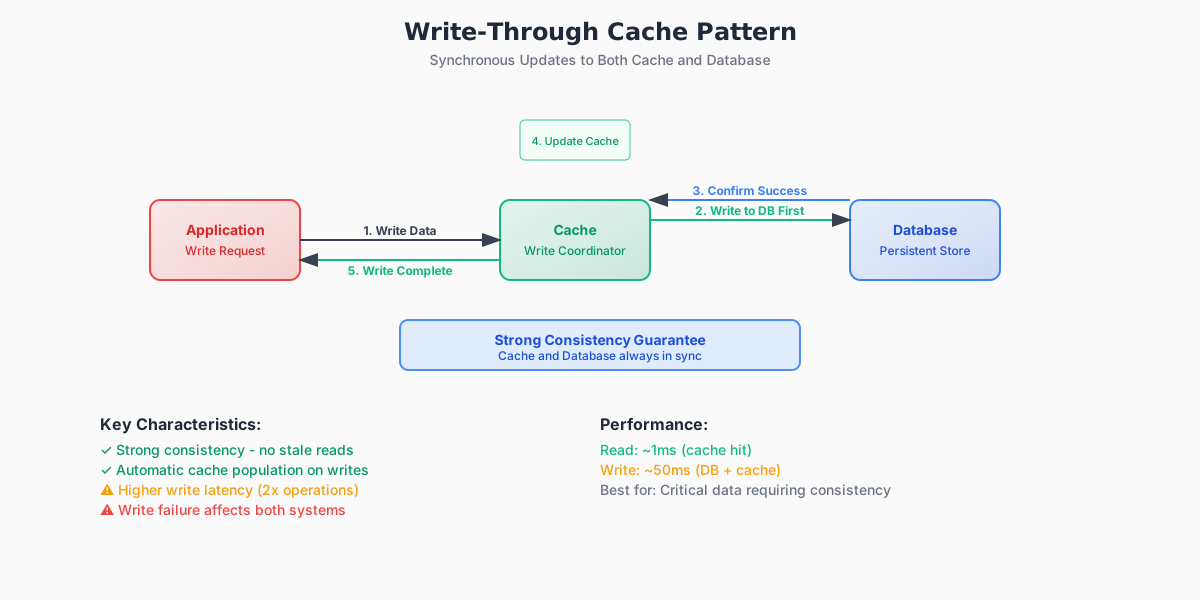 Zoom
Zoom
1def update_user_profile(user_id, profile_data):
2    # Both cache and database updated together
3    write_through_cache.set(f"profile:{user_id}", profile_data)
4
5class WriteThroughCache:
6    def set(self, key, value):
7        # Write to database first (ensures durability)
8        self._database.write(key, value)
9        # Then update cache (ensures fresh reads)
10        self._cache.set(key, value)
11 # Both operations must succeed or transaction fails1def update_user_profile(user_id, profile_data):
2 # Both cache and database updated together
3 write_through_cache.set(f"profile:{user_id}", profile_data)
4
5class WriteThroughCache:
6 def set(self, key, value):
7 # Write to database first (ensures durability)
8 self._database.write(key, value)
9 # Then update cache (ensures fresh reads)
10 self._cache.set(key, value)
11 # Both operations must succeed or transaction failsPros: Strong consistency, cache always has fresh data, no cache invalidation needed
Cons: Higher write latency, write failures affect both cache and database
Write-Behind (Write-Back)
Cache accepts writes immediately, database updates happen asynchronously.
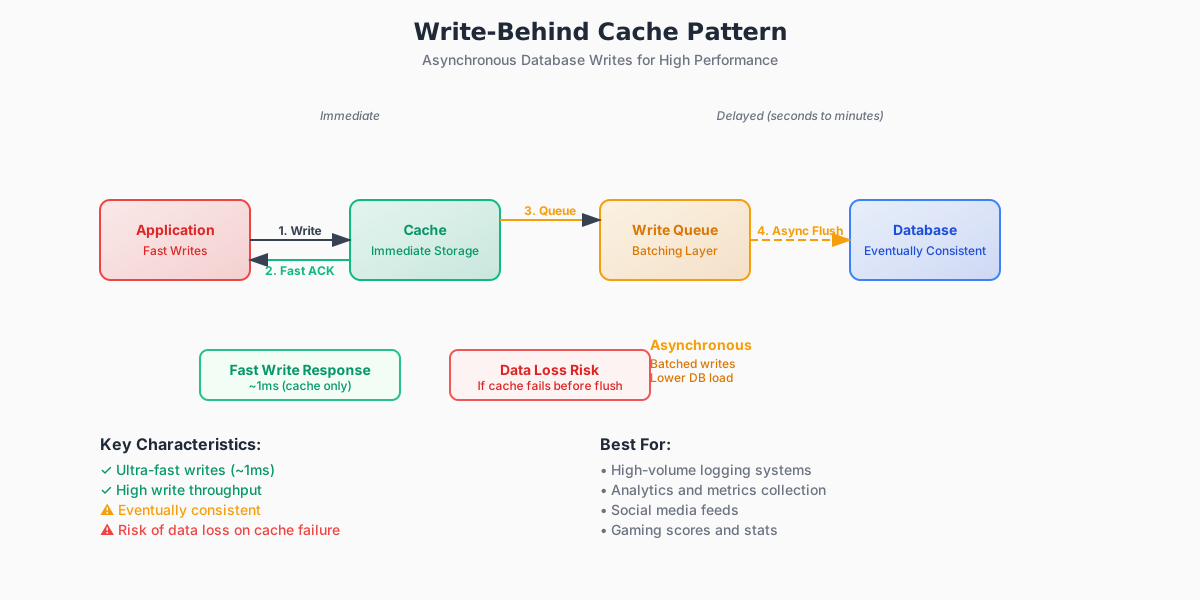 Zoom
Zoom
1def update_user_profile(user_id, profile_data):
2    # Fast cache update, database writes queued
3    write_behind_cache.set(f"profile:{user_id}", profile_data)
4
5class WriteBehindCache:
6    def set(self, key, value):
7        # Update cache immediately (fast response)
8        self._cache.set(key, value)
9        # Queue database write for later (async)
10        self._write_queue.enqueue(key, value)
11        # Risk: data loss if cache crashes before flush
12
13    def _background_flush(self):
14        # Periodic or event-driven database updates
15        while True:
16            batch = self._write_queue.get_batch(size=100)
17            for key, value in batch:
18                try:
19                    self._database.write(key, value)
20                except Exception as e:
21                    # Handle write failures (retry, dead letter queue)
22 self._handle_write_failure(key, value, e)1def update_user_profile(user_id, profile_data):
2 # Fast cache update, database writes queued
3 write_behind_cache.set(f"profile:{user_id}", profile_data)
4
5class WriteBehindCache:
6 def set(self, key, value):
7 # Update cache immediately (fast response)
8 self._cache.set(key, value)
9 # Queue database write for later (async)
10 self._write_queue.enqueue(key, value)
11 # Risk: data loss if cache crashes before flush
12
13 def _background_flush(self):
14 # Periodic or event-driven database updates
15 while True:
16 batch = self._write_queue.get_batch(size=100)
17 for key, value in batch:
18 try:
19 self._database.write(key, value)
20 except Exception as e:
21 # Handle write failures (retry, dead letter queue)
22 self._handle_write_failure(key, value, e)Pros: Low write latency, high write throughput, batch optimizations possible Cons: Risk of data loss, eventual consistency, complex failure handling
Pattern Comparison
| Pattern | Write Location | Read Source | Write Latency | Consistency | Complexity | Use When |
|---|---|---|---|---|---|---|
| Write-Aside | App manages both | Cache + DB fallback | DB latency | Eventual | Low | General purpose, need control |
| Read-Through | App writes DB | Cache auto-loads | DB latency | Good | Medium | Read-heavy, simple caching |
| Write-Through | Cache manages both | Cache primarily | DB + Cache latency | Strong | Medium | Need fresh reads, can accept write latency |
| Write-Behind | Cache, async DB | Cache primarily | Cache latency | Eventual | High | High write volume, can tolerate data loss |
Choosing the Right Pattern
Use Write-Aside when:
- You need full control over caching logic
- Different data types need different caching strategies
- You're retrofitting caching to existing applications
Use Read-Through when:
- You have read-heavy workloads
- You want to simplify application code
- Cache misses are acceptable (not time-critical)
Use Write-Through when:
- You need strong consistency guarantees
- Read performance is more critical than write performance
- You can tolerate higher write latency
Use Write-Behind when:
- You have high write volumes
- You can tolerate some data loss risk
- Write latency is critical to user experience
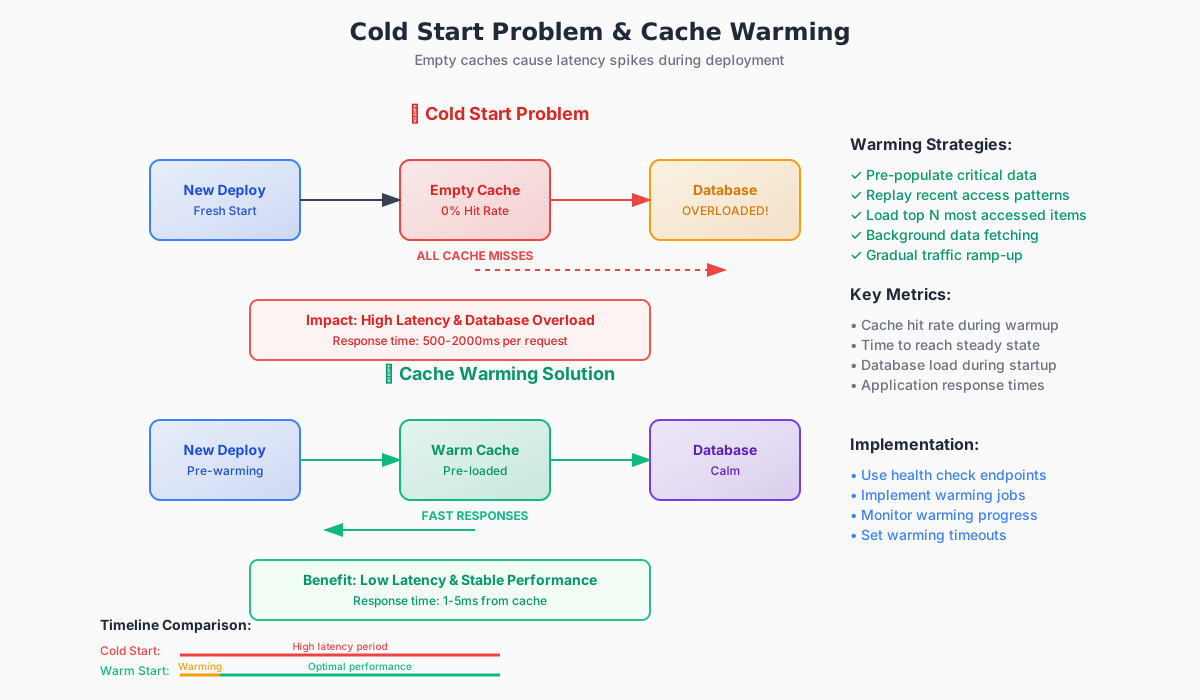
Cold Start Reality: New deployments start with empty caches, causing latency spikes until warmed up.
Memory Management
Memory is expensive, so caches need strategies to make room for new data.
Eviction Policies
When cache is full, which entries get removed?
| Policy | Removes | Best For | Trade-off |
|---|---|---|---|
| LRU | Least recently used | Temporal locality workloads | Can evict large, infrequently accessed items |
| LFU | Least frequently used | Stable popularity patterns | Poor handling of traffic spikes |
| TTL-aware | Expired items first | Time-sensitive data | Requires accurate TTL tuning |
LRU Implementation Example:
1from collections import OrderedDict
2
3class LRUCache:
4    def __init__(self, capacity):
5        self.capacity = capacity
6        self.cache = OrderedDict()
7
8    def get(self, key):
9        if key in self.cache:
10            # Move to end (most recently used)
11            self.cache.move_to_end(key)
12            return self.cache[key]
13        return None
14
15    def set(self, key, value):
16        if key in self.cache:
17            # Update existing key
18            self.cache.move_to_end(key)
19        elif len(self.cache) >= self.capacity:
20            # Remove least recently used (first item)
21            self.cache.popitem(last=False)
22        self.cache[key] = value
23
24cache = LRUCache(capacity=3)
25cache.set("user:1", {"name": "Alice"})
26cache.set("user:2", {"name": "Bob"})
27cache.set("user:3", {"name": "Carol"})
28cache.get("user:1")  # Alice becomes most recent
29cache.set("user:4", {"name": "Dave"}) # Bob gets evicted1from collections import OrderedDict
2
3class LRUCache:
4 def __init__(self, capacity):
5 self.capacity = capacity
6 self.cache = OrderedDict()
7
8 def get(self, key):
9 if key in self.cache:
10 # Move to end (most recently used)
11 self.cache.move_to_end(key)
12 return self.cache[key]
13 return None
14
15 def set(self, key, value):
16 if key in self.cache:
17 # Update existing key
18 self.cache.move_to_end(key)
19 elif len(self.cache) >= self.capacity:
20 # Remove least recently used (first item)
21 self.cache.popitem(last=False)
22 self.cache[key] = value
23
24cache = LRUCache(capacity=3)
25cache.set("user:1", {"name": "Alice"})
26cache.set("user:2", {"name": "Bob"})
27cache.set("user:3", {"name": "Carol"})
28cache.get("user:1") # Alice becomes most recent
29cache.set("user:4", {"name": "Dave"}) # Bob gets evictedExpiration (TTL)
Time-To-Live automatically removes entries after a set duration.
# TTL Examples
cache.set("session:abc", user_data, ttl=1800)  # 30 minutes
cache.set("config:app", settings, ttl=86400)   # 24 hours
cache.set("trending", posts, ttl=300)          # 5 minutes
# TTL Examples
cache.set("session:abc", user_data, ttl=1800) # 30 minutes
cache.set("config:app", settings, ttl=86400) # 24 hours
cache.set("trending", posts, ttl=300) # 5 minutesTTL Strategy Guide:
- Short TTL (1-5 min): Frequently changing data (live scores, trending content)
- Medium TTL (30-60 min): User-generated content, semi-static data
- Long TTL (hours/days): Configuration, rarely-changing reference data
Sliding TTL: Extend expiration time on each access - useful for session data.
Simple TTL Cache Implementation
To make these concepts concrete, here's a basic TTL-based cache implementation:
1"""
2Simple TTL Based Cache Implementation
3
4A basic cache where entries automatically expire after a specified time period.
5This example demonstrates core TTL concepts for educational purposes.
6"""
7
8import time
9from typing import Any, Optional
10
11class SimpleCache:
12
13    def __init__(self, default_ttl: float = 60.0):
14        self._cache: dict[str, dict[str, Any]] = {}
15        self._default_ttl = default_ttl
16
17    def set(self, key: str, value: Any, ttl: Optional[float] = None) -> None:
18        expiration_time = time.time() + (ttl if ttl is not None else self._default_ttl)
19        self._cache[key] = {
20            "value": value,
21            "expires_at": expiration_time
22        }
23
24    def get(self, key: str) -> Optional[Any]:
25        if key not in self._cache:
26            return None
27
28        entry = self._cache[key]
29
30        # Check if key has expired
31        if time.time() > entry["expires_at"]:
32            # Lazy deletion: remove expired entry on access
33            del self._cache[key]
34            return None
35
36        return entry["value"]
37
38    def delete(self, key: str) -> bool:
39        if key in self._cache:
40            del self._cache[key]
41            return True
42        return False
43
44cache = SimpleCache(default_ttl=2.0)  # 2 second default TTL
45
46cache.set("user:123", {"name": "Alice", "role": "admin"})
47cache.set("session:abc", "active", ttl=1.0)  # Custom 1 second TTL
48
49print(f"user:123 = {cache.get('user:123')}")  # Valid
50time.sleep(1.5)
51print(f"session:abc = {cache.get('session:abc')}") # Expired → None1"""
2Simple TTL Based Cache Implementation
3
4A basic cache where entries automatically expire after a specified time period.
5This example demonstrates core TTL concepts for educational purposes.
6"""
7
8import time
9from typing import Any, Optional
10
11class SimpleCache:
12
13 def __init__(self, default_ttl: float = 60.0):
14 self._cache: dict[str, dict[str, Any]] = {}
15 self._default_ttl = default_ttl
16
17 def set(self, key: str, value: Any, ttl: Optional[float] = None) -> None:
18 expiration_time = time.time() + (ttl if ttl is not None else self._default_ttl)
19 self._cache[key] = {
20 "value": value,
21 "expires_at": expiration_time
22 }
23
24 def get(self, key: str) -> Optional[Any]:
25 if key not in self._cache:
26 return None
27
28 entry = self._cache[key]
29
30 # Check if key has expired
31 if time.time() > entry["expires_at"]:
32 # Lazy deletion: remove expired entry on access
33 del self._cache[key]
34 return None
35
36 return entry["value"]
37
38 def delete(self, key: str) -> bool:
39 if key in self._cache:
40 del self._cache[key]
41 return True
42 return False
43
44cache = SimpleCache(default_ttl=2.0) # 2 second default TTL
45
46cache.set("user:123", {"name": "Alice", "role": "admin"})
47cache.set("session:abc", "active", ttl=1.0) # Custom 1 second TTL
48
49print(f"user:123 = {cache.get('user:123')}") # Valid
50time.sleep(1.5)
51print(f"session:abc = {cache.get('session:abc')}") # Expired → NoneThis implementation demonstrates lazy expiration—entries are only removed when accessed after their TTL expires. Production caches often use background cleanup processes to manage memory more efficiently.
Common Pitfalls and Operational Concerns
Stale/Inconsistent Reads
This is the core trade-off. In a multi-writer distributed system, invalidation vs. update propagation is where most design errors happen.
Cache Stampede (thundering herd)
This happens when many requests miss simultaneously and overwhelm the backing store. Mitigations: request coalescing, locks/mutexes per key, randomized TTLs (jitter), or "probabilistic early refresh."
Key Design and Namespaces
Poor key schemes (e.g., using raw user objects without versioning) make validation hard. We should include versioning or compose keys with version/timestamp where appropriate.
Key Design Best Practices:
1class CacheKeyBuilder:
2    """Standardized cache key construction"""
3
4    @staticmethod
5    def user_profile(user_id: int, version: int = 1) -> str:
6        return f"user:profile:{user_id}:v{version}"
7
8    @staticmethod
9    def session_data(session_id: str) -> str:
10        return f"session:{session_id}"
11
12    @staticmethod
13    def product_inventory(product_id: str, region: str) -> str:
14        return f"inventory:{region}:{product_id}"
15
16    @staticmethod
17    def with_timestamp(base_key: str) -> str:
18        """Add timestamp for debugging cache freshness"""
19        import time
20        timestamp = int(time.time())
21        return f"{base_key}:ts{timestamp}"
22
23user_key = CacheKeyBuilder.user_profile(user_id=123, version=2) # Good key examples # Result: "user:profile:123:v2"
24
25session_key = CacheKeyBuilder.session_data("abc-def-123") # Result: "session:abc-def-123"
26
27inventory_key = CacheKeyBuilder.product_inventory("laptop-pro", "us-west") # Result: "inventory:us-west:laptop-pro"
28
29def update_user_profile(user_id: int, profile_data: dict):
30    """
31    Versioned keys for cache busting
32    """
33    # Increment version to invalidate old cache entries
34    new_version = get_user_version(user_id) + 1
35    key = CacheKeyBuilder.user_profile(user_id, new_version)
36    cache.set(key, profile_data, ttl=300)
37
38    # Update version reference
39    version_key = f"user:version:{user_id}"
40 cache.set(version_key, new_version, ttl=86400)1class CacheKeyBuilder:
2 """Standardized cache key construction"""
3
4 @staticmethod
5 def user_profile(user_id: int, version: int = 1) -> str:
6 return f"user:profile:{user_id}:v{version}"
7
8 @staticmethod
9 def session_data(session_id: str) -> str:
10 return f"session:{session_id}"
11
12 @staticmethod
13 def product_inventory(product_id: str, region: str) -> str:
14 return f"inventory:{region}:{product_id}"
15
16 @staticmethod
17 def with_timestamp(base_key: str) -> str:
18 """Add timestamp for debugging cache freshness"""
19 import time
20 timestamp = int(time.time())
21 return f"{base_key}:ts{timestamp}"
22
23user_key = CacheKeyBuilder.user_profile(user_id=123, version=2) # Good key examples # Result: "user:profile:123:v2"
24
25session_key = CacheKeyBuilder.session_data("abc-def-123") # Result: "session:abc-def-123"
26
27inventory_key = CacheKeyBuilder.product_inventory("laptop-pro", "us-west") # Result: "inventory:us-west:laptop-pro"
28
29def update_user_profile(user_id: int, profile_data: dict):
30 """
31 Versioned keys for cache busting
32 """
33 # Increment version to invalidate old cache entries
34 new_version = get_user_version(user_id) + 1
35 key = CacheKeyBuilder.user_profile(user_id, new_version)
36 cache.set(key, profile_data, ttl=300)
37
38 # Update version reference
39 version_key = f"user:version:{user_id}"
40 cache.set(version_key, new_version, ttl=86400)Eviction Churn
High eviction rates mean the cache is under-provisioned or mis-keyed; we may be paying memory costs without latency benefits.
Key Metrics to Track
Hit Rate
This is measured as - hits / total_requests. A frequently cited engineering target is , but that is only useful if the cached values are sufficiently fresh for our use-case. High hit rate alone is not a success metric.
Staleness Ratio
This is measured as - stale_reads / total_reads. Measuring stale reads requires a way to compare cache responses against the authoritative source (version numbers, write timestamps, or sampling).
Miss Penalty
This is latency and load added to the backing store when a miss occurs.
Eviction/sec and Memory Utilization
These two metrics tell us if we need more capacity or different eviction logic.
Write Amplification
Number of operations caused by a single logical write (important for write-through or write-behind designs).
From First Principles
Caches are effective because of two simple facts:
- Memory is faster than disk or network.
- Access locality: reads are often concentrated on a small subset of dataset.
These assumptions break down when writes are frequent, access patterns are evenly distributed, or multi-writer consistency is required. In those cases, the cost of stale data, hard-to-produce bugs, and operational complexity can outweigh the latency gains.
The Core Problem: Cache Inconsistency
Every cache creates a copy of data. Copies can diverge from the authoritative source (database). This is the fundamental challenge of caching.
Where Inconsistency Comes From
Update Propagation Delays
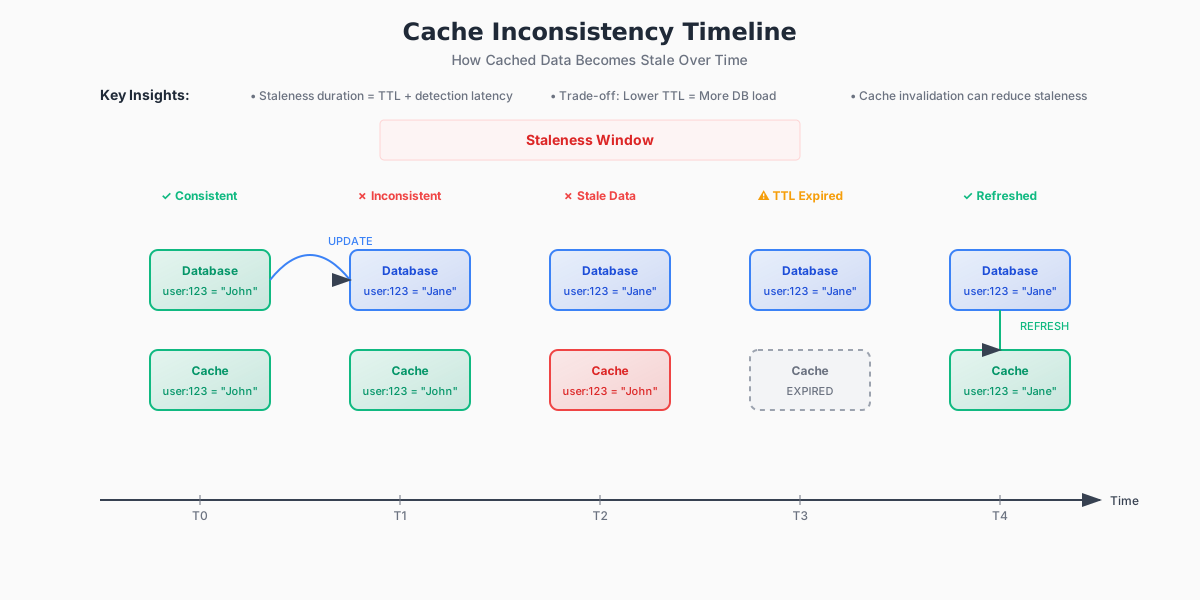 Zoom
Window of inconsistency: 5 seconds
Zoom
Window of inconsistency: 5 seconds
Multiple Writers
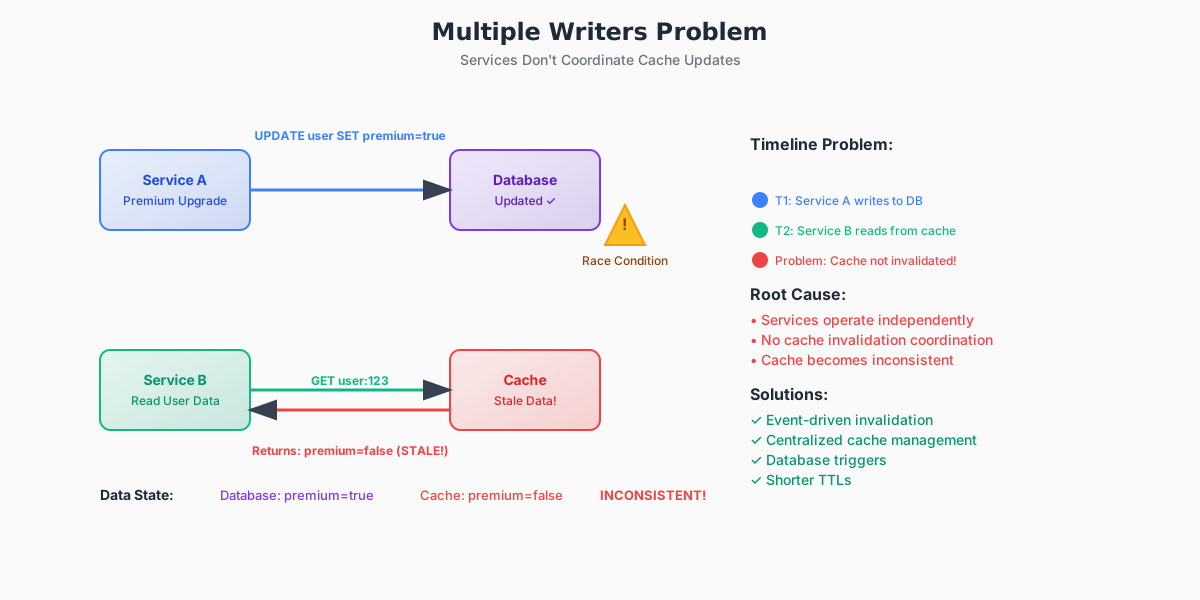 Zoom
Zoom
Services don't coordinate cache updates.
Partial Failures
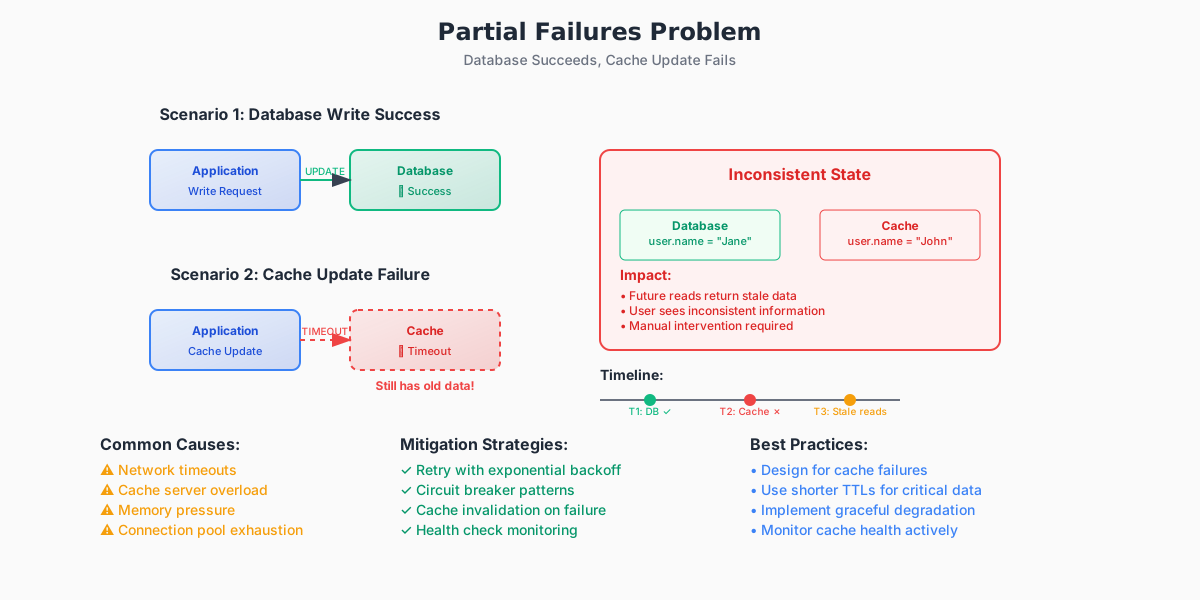 Zoom
Zoom
Real-World Impact
Low stakes: Showing slightly outdated "last login" time Medium stakes: Displaying wrong inventory count High stakes: Wrong account balance, pricing, or permissions
CAP Theorem Connection: Caches choose Availability (fast responses) over Consistency (fresh data). This is usually the right trade-off, but it requires careful management.
Common Failure Modes and Pragmatic Mitigation
Following are few common failure modes we usually encounter and their mitigation strategies:
Stale Reads
- Symptom: cache returns an outdated value
- Impact: ranges from "no user-visible effect" to "incorrect billing/compliance breach".
- Mitigations:
- Use short, measured TTLs for data that changes frequently. Shortening TTLs reduces the window in which reads can be stale, but increases miss rate and load on the backing store.
- Invalidate on write (delete the key) instead of updating the cache in-place when we need correctness. This make invalidation explicit and reduces ordering headaches.
- Use versioned keys or value versioning (e.g.,
user:123:v32) so readers can detect stale versions and refresh when necessary. - For critical paths, prefer synchronous write-through or a strongly-consistent store instead of caching.
Thundering Herd (Cache Stampede)
Problem: Hot key expires, all requests hit database simultaneously
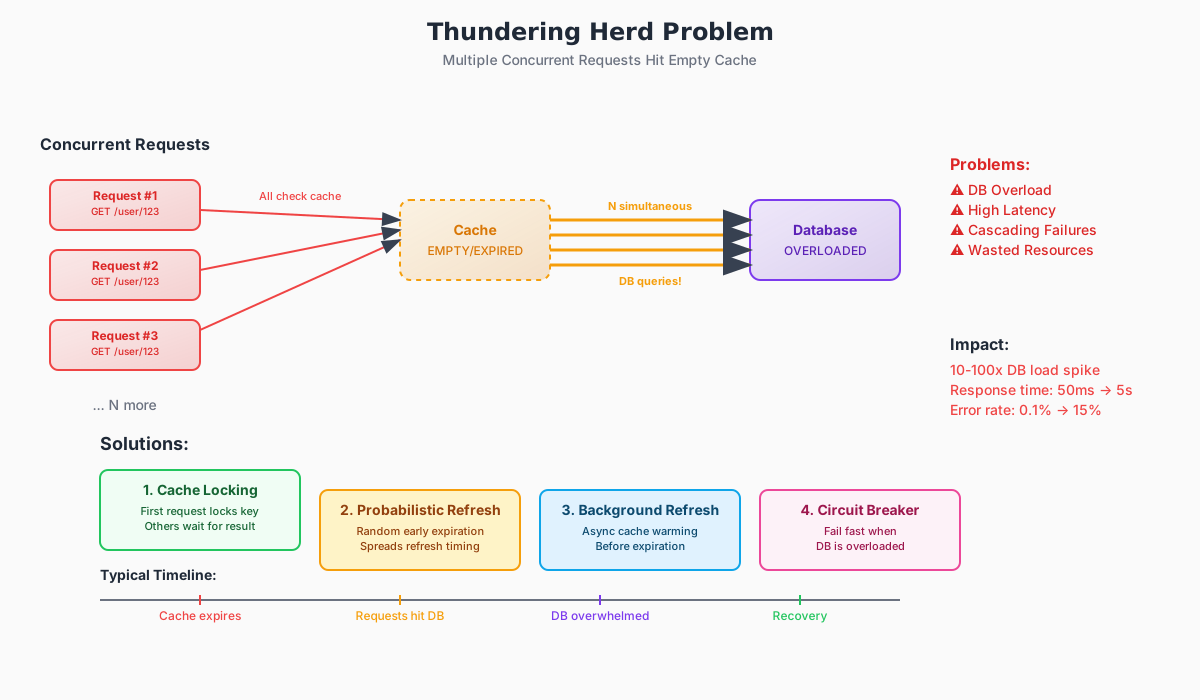 Zoom
Zoom
- Mitigations:
- Request Coalescing: Let one request populate cache while others wait
- Randomized TTLs: Add jitter to prevent synchronized expiration
- Stale-while-revalidate: Serve old data while refreshing in background
Request Coalescing Implementation:
1import asyncio
2from typing import Dict, Any, Awaitable
3
4class CoalescingCache:
5    def __init__(self):
6        self._cache: Dict[str, Any] = {}
7        self._pending: Dict[str, asyncio.Future] = {}
8
9    async def get(self, key: str) -> Any:
10        # Check cache first
11        if key in self._cache:
12            return self._cache[key]
13
14        # Check if already fetching this key
15        if key in self._pending:
16            # Wait for the ongoing request
17            return await self._pending[key]
18
19        # Start new fetch and let others wait
20        future = asyncio.create_task(self._fetch_from_db(key))
21        self._pending[key] = future
22
23        try:
24            value = await future
25            self._cache[key] = value
26            return value
27        finally:
28            # Clean up pending request
29            del self._pending[key]
30
31    async def _fetch_from_db(self, key: str) -> Any:
32        # Simulate database call
33        await asyncio.sleep(0.1)  # 100ms DB call
34        return f"data_for_{key}"
35
36cache = CoalescingCache() # Multiple requests for same key only trigger one DB call1import asyncio
2from typing import Dict, Any, Awaitable
3
4class CoalescingCache:
5 def __init__(self):
6 self._cache: Dict[str, Any] = {}
7 self._pending: Dict[str, asyncio.Future] = {}
8
9 async def get(self, key: str) -> Any:
10 # Check cache first
11 if key in self._cache:
12 return self._cache[key]
13
14 # Check if already fetching this key
15 if key in self._pending:
16 # Wait for the ongoing request
17 return await self._pending[key]
18
19 # Start new fetch and let others wait
20 future = asyncio.create_task(self._fetch_from_db(key))
21 self._pending[key] = future
22
23 try:
24 value = await future
25 self._cache[key] = value
26 return value
27 finally:
28 # Clean up pending request
29 del self._pending[key]
30
31 async def _fetch_from_db(self, key: str) -> Any:
32 # Simulate database call
33 await asyncio.sleep(0.1) # 100ms DB call
34 return f"data_for_{key}"
35
36cache = CoalescingCache() # Multiple requests for same key only trigger one DB callRace Conditions on Write
- Symptom: concurrent updates and inconsistent cache ordering leave cache with a wrong value.
- Mitigations:
- Use compare-and-set (CAS) semantics or sequence numbers on updates: only accept cache writes if the version is newer.
- Apply a canonical writer or serialize updates for a shard of keys where ordering matters.
- Use idempotent writes and make replays safe.
Race Condition Example
Multiple services updating the same cache key can cause data loss:
1"""
2Concurrent Writes: Demonstrating Race Conditions
3
4This example shows how concurrent cache updates can lead to
5inconsistent state when proper synchronization isn't implemented.
6"""
7
8import threading
9import time
10import random
11from typing import Dict, Any
12
13class UnsafeCache:
14    """A cache implementation without proper synchronization"""
15
16    def __init__(self):
17        self._cache: Dict[str, Any] = {}
18        self._stats = {'writes': 0, 'race_conditions': 0}
19
20    def set(self, key: str, value: Any, source: str) -> None:
21        # Simulate processing time that can cause race conditions
22        time.sleep(random.uniform(0.001, 0.01))
23
24        # Check for potential race condition
25        if key in self._cache and self._cache[key] != value:
26            self._stats['race_conditions'] += 1
27            print(f"RACE CONDITION: {source} overwrote {key}")
28
29        self._cache[key] = value
30        self._stats['writes'] += 1
31        print(f"{source}: Set {key} = {value}")
32
33    def get(self, key: str) -> Any:
34        return self._cache.get(key)
35
36    def get_stats(self) -> Dict[str, int]:
37        return self._stats.copy()
38
39cache = UnsafeCache()
40
41def update_user_profile(cache: UnsafeCache, user_id: str, thread_name: str):
42    """Simulate multiple services updating the same user profile"""
43    for i in range(3):
44        # Each thread updates different fields, but same cache key
45        profile_data = {
46            'last_updated_by': thread_name,
47            'timestamp': time.time(),
48            'update_count': i + 1
49        }
50        cache.set(f"user:{user_id}", profile_data, thread_name)
51        time.sleep(random.uniform(0.01, 0.05))
52
53threads = []
54for i in range(3):
55    thread = threading.Thread(
56        target=update_user_profile,
57        args=(cache, "123", f"Service-{i+1}")
58    )
59    threads.append(thread)
60
61print("Starting concurrent cache updates...")
62start_time = time.time()
63
64for thread in threads:
65    thread.start()
66
67for thread in threads:
68    thread.join()
69
70print(f"\nResults after {time.time() - start_time:.2f} seconds:")
71print(f"Total writes: {cache.get_stats()['writes']}")
72print(f"Race conditions detected: {cache.get_stats()['race_conditions']}")
73print(f"Final cache state: {cache.get('user:123')}")1"""
2Concurrent Writes: Demonstrating Race Conditions
3
4This example shows how concurrent cache updates can lead to
5inconsistent state when proper synchronization isn't implemented.
6"""
7
8import threading
9import time
10import random
11from typing import Dict, Any
12
13class UnsafeCache:
14 """A cache implementation without proper synchronization"""
15
16 def __init__(self):
17 self._cache: Dict[str, Any] = {}
18 self._stats = {'writes': 0, 'race_conditions': 0}
19
20 def set(self, key: str, value: Any, source: str) -> None:
21 # Simulate processing time that can cause race conditions
22 time.sleep(random.uniform(0.001, 0.01))
23
24 # Check for potential race condition
25 if key in self._cache and self._cache[key] != value:
26 self._stats['race_conditions'] += 1
27 print(f"RACE CONDITION: {source} overwrote {key}")
28
29 self._cache[key] = value
30 self._stats['writes'] += 1
31 print(f"{source}: Set {key} = {value}")
32
33 def get(self, key: str) -> Any:
34 return self._cache.get(key)
35
36 def get_stats(self) -> Dict[str, int]:
37 return self._stats.copy()
38
39cache = UnsafeCache()
40
41def update_user_profile(cache: UnsafeCache, user_id: str, thread_name: str):
42 """Simulate multiple services updating the same user profile"""
43 for i in range(3):
44 # Each thread updates different fields, but same cache key
45 profile_data = {
46 'last_updated_by': thread_name,
47 'timestamp': time.time(),
48 'update_count': i + 1
49 }
50 cache.set(f"user:{user_id}", profile_data, thread_name)
51 time.sleep(random.uniform(0.01, 0.05))
52
53threads = []
54for i in range(3):
55 thread = threading.Thread(
56 target=update_user_profile,
57 args=(cache, "123", f"Service-{i+1}")
58 )
59 threads.append(thread)
60
61print("Starting concurrent cache updates...")
62start_time = time.time()
63
64for thread in threads:
65 thread.start()
66
67for thread in threads:
68 thread.join()
69
70print(f"\nResults after {time.time() - start_time:.2f} seconds:")
71print(f"Total writes: {cache.get_stats()['writes']}")
72print(f"Race conditions detected: {cache.get_stats()['race_conditions']}")
73print(f"Final cache state: {cache.get('user:123')}")This example shows how concurrent updates to the same cache key can result in data loss and inconsistent state. In production systems, this is mitigated through proper synchronization, versioning, or atomic operations.
Measuring the Impact: How to Quantify Staleness
Staleness Ratio (operational)
Compare sampled cache responses to the authoritative source:
where,
We can instrument this by sampling a subset of keys, reading the authoritative source (or using version numbers), and computing the mismatch rate. This needs careful production-safe sampling to avoid extra load spikes.
Beyond the Basic Model
The simple model assumes uniform access patterns, but real systems are more complex:
Hot Key Effect (Zipfian Distribution)
Most traffic hits a small subset of keys. If hot keys become stale, the impact is amplified.
1def calculate_hot_key_impact(total_keys=10000, hot_percentage=0.01):
2    hot_keys = int(total_keys * hot_percentage)  # Top 1% of keys
3
4    # Hot keys typically receive 80% of traffic (80/20 rule)
5    hot_traffic_share = 0.80
6
7    print(f"Hot keys ({hot_keys}) handle {hot_traffic_share:.0%} of traffic")
8    print(f"→ Staleness in hot keys has {hot_traffic_share/hot_percentage:.0f}x impact")
9
10calculate_hot_key_impact() # Output: Hot keys (100) handle 80% of traffic
11 # → Staleness in hot keys has 80x impact1def calculate_hot_key_impact(total_keys=10000, hot_percentage=0.01):
2 hot_keys = int(total_keys * hot_percentage) # Top 1% of keys
3
4 # Hot keys typically receive 80% of traffic (80/20 rule)
5 hot_traffic_share = 0.80
6
7 print(f"Hot keys ({hot_keys}) handle {hot_traffic_share:.0%} of traffic")
8 print(f"→ Staleness in hot keys has {hot_traffic_share/hot_percentage:.0f}x impact")
9
10calculate_hot_key_impact() # Output: Hot keys (100) handle 80% of traffic
11 # → Staleness in hot keys has 80x impactFailure Amplification
During network partitions or node failures, invalidation success rates drop, increasing effective staleness beyond the basic model predictions.
Key insight: Design for failure scenarios, not just healthy-state performance.
Measuring Cache Staleness Impact Implementation
Here's a practical implementation that simulates cache staleness and measures its impact:
1"""
2Measuring Cache Staleness Impact
3
4This simulation demonstrates how to quantify cache staleness
5and measure its impact on system behavior with realistic workloads.
6"""
7
8import time
9import random
10import threading
11from dataclasses import dataclass
12from typing import Dict, List, Optional
13from collections import defaultdict
14
15@dataclass
16class StalnessMetrics:
17    total_reads: int = 0
18    stale_reads: int = 0
19    cache_hits: int = 0
20    cache_misses: int = 0
21    avg_staleness_duration: float = 0.0
22
23class DatabaseSimulator:
24    """Simulates a backend database with versioned data"""
25
26    def __init__(self):
27        self._data: Dict[str, Dict] = {}
28        self._lock = threading.Lock()
29
30    def write(self, key: str, value: str, timestamp: float) -> int:
31        with self._lock:
32            version = int(timestamp * 1000)  # Use timestamp as version
33            self._data[key] = {
34                'value': value,
35                'version': version,
36                'timestamp': timestamp
37            }
38            return version
39
40    def read(self, key: str) -> Optional[Dict]:
41        with self._lock:
42            return self._data.get(key)
43
44class MonitoredCache:
45    """Cache with staleness monitoring capabilities"""
46
47    def __init__(self, ttl: float = 5.0):
48        self._cache: Dict[str, Dict] = {}
49        self._ttl = ttl
50        self._metrics = StalnessMetrics()
51        self._lock = threading.Lock()
52
53    def set(self, key: str, value: str, version: int, timestamp: float) -> None:
54        expires_at = timestamp + self._ttl
55        with self._lock:
56            self._cache[key] = {
57                'value': value,
58                'version': version,
59                'timestamp': timestamp,
60                'expires_at': expires_at
61            }
62
63    def get(self, key: str, db: DatabaseSimulator) -> tuple[Optional[str], bool]:
64        current_time = time.time()
65
66        with self._lock:
67            self._metrics.total_reads += 1
68
69            # Check cache first
70            if key in self._cache:
71                cached_entry = self._cache[key]
72
73                # Check if expired
74                if current_time > cached_entry['expires_at']:
75                    del self._cache[key]
76                else:
77                    self._metrics.cache_hits += 1
78
79                    # Check staleness by comparing with database
80                    db_entry = db.read(key)
81                    if db_entry and db_entry['version'] > cached_entry['version']:
82                        self._metrics.stale_reads += 1
83                        staleness_duration = current_time - cached_entry['timestamp']
84                        self._metrics.avg_staleness_duration = (
85                            (self._metrics.avg_staleness_duration * (self._metrics.stale_reads - 1) +
86                             staleness_duration) / self._metrics.stale_reads
87                        )
88                        return cached_entry['value'], True  # stale hit
89
90                    return cached_entry['value'], False  # fresh hit
91
92            # Cache miss - read from database
93            self._metrics.cache_misses += 1
94            db_entry = db.read(key)
95            if db_entry:
96                # Populate cache
97                self.set(key, db_entry['value'], db_entry['version'], current_time)
98                return db_entry['value'], False
99
100            return None, False
101
102    def get_metrics(self) -> StalnessMetrics:
103        with self._lock:
104            return StalnessMetrics(
105                total_reads=self._metrics.total_reads,
106                stale_reads=self._metrics.stale_reads,
107                cache_hits=self._metrics.cache_hits,
108                cache_misses=self._metrics.cache_misses,
109                avg_staleness_duration=self._metrics.avg_staleness_duration
110            )
111
112def simulate_workload():
113    """Simulate a realistic read/write workload"""
114    db = DatabaseSimulator()
115    cache = MonitoredCache(ttl=3.0)  # 3 second TTL
116
117    # Initial data population
118    keys = [f"user:{i}" for i in range(10)]
119    for key in keys:
120        db.write(key, f"initial_value_{key}", time.time())
121
122    def writer_thread():
123        """Simulate periodic writes"""
124        for _ in range(20):
125            key = random.choice(keys)
126            value = f"updated_{key}_{int(time.time())}"
127            timestamp = time.time()
128            db.write(key, value, timestamp)
129            print(f"WRITE: {key} = {value}")
130            time.sleep(random.uniform(0.5, 2.0))
131
132    def reader_thread(thread_id: int):
133        """Simulate read traffic"""
134        for _ in range(50):
135            key = random.choice(keys)
136            value, is_stale = cache.get(key, db)
137            status = "STALE" if is_stale else "FRESH"
138            print(f"READ-{thread_id}: {key} = {value} ({status})")
139            time.sleep(random.uniform(0.1, 0.5))
140
141    # Start simulation
142    print("Starting cache staleness simulation...")
143    start_time = time.time()
144
145    # Create threads
146    threads = []
147
148    # One writer thread
149    writer = threading.Thread(target=writer_thread)
150    threads.append(writer)
151
152    # Multiple reader threads
153    for i in range(3):
154        reader = threading.Thread(target=reader_thread, args=(i,))
155        threads.append(reader)
156
157    # Start all threads
158    for thread in threads:
159        thread.start()
160
161    # Wait for completion
162    for thread in threads:
163        thread.join()
164
165    # Print results
166    duration = time.time() - start_time
167    metrics = cache.get_metrics()
168
169    print(f"\n{'='*50}")
170    print(f"SIMULATION RESULTS ({duration:.1f}s)")
171    print(f"{'='*50}")
172    print(f"Total reads: {metrics.total_reads}")
173    print(f"Cache hits: {metrics.cache_hits}")
174    print(f"Cache misses: {metrics.cache_misses}")
175    print(f"Stale reads: {metrics.stale_reads}")
176
177    if metrics.total_reads > 0:
178        hit_rate = (metrics.cache_hits / metrics.total_reads) * 100
179        staleness_rate = (metrics.stale_reads / metrics.total_reads) * 100
180        print(f"Hit rate: {hit_rate:.1f}%")
181        print(f"Staleness rate: {staleness_rate:.1f}%")
182
183        if metrics.stale_reads > 0:
184            print(f"Avg staleness duration: {metrics.avg_staleness_duration:.2f}s")
185
186if __name__ == "__main__":
187 simulate_workload()1"""
2Measuring Cache Staleness Impact
3
4This simulation demonstrates how to quantify cache staleness
5and measure its impact on system behavior with realistic workloads.
6"""
7
8import time
9import random
10import threading
11from dataclasses import dataclass
12from typing import Dict, List, Optional
13from collections import defaultdict
14
15@dataclass
16class StalnessMetrics:
17 total_reads: int = 0
18 stale_reads: int = 0
19 cache_hits: int = 0
20 cache_misses: int = 0
21 avg_staleness_duration: float = 0.0
22
23class DatabaseSimulator:
24 """Simulates a backend database with versioned data"""
25
26 def __init__(self):
27 self._data: Dict[str, Dict] = {}
28 self._lock = threading.Lock()
29
30 def write(self, key: str, value: str, timestamp: float) -> int:
31 with self._lock:
32 version = int(timestamp * 1000) # Use timestamp as version
33 self._data[key] = {
34 'value': value,
35 'version': version,
36 'timestamp': timestamp
37 }
38 return version
39
40 def read(self, key: str) -> Optional[Dict]:
41 with self._lock:
42 return self._data.get(key)
43
44class MonitoredCache:
45 """Cache with staleness monitoring capabilities"""
46
47 def __init__(self, ttl: float = 5.0):
48 self._cache: Dict[str, Dict] = {}
49 self._ttl = ttl
50 self._metrics = StalnessMetrics()
51 self._lock = threading.Lock()
52
53 def set(self, key: str, value: str, version: int, timestamp: float) -> None:
54 expires_at = timestamp + self._ttl
55 with self._lock:
56 self._cache[key] = {
57 'value': value,
58 'version': version,
59 'timestamp': timestamp,
60 'expires_at': expires_at
61 }
62
63 def get(self, key: str, db: DatabaseSimulator) -> tuple[Optional[str], bool]:
64 current_time = time.time()
65
66 with self._lock:
67 self._metrics.total_reads += 1
68
69 # Check cache first
70 if key in self._cache:
71 cached_entry = self._cache[key]
72
73 # Check if expired
74 if current_time > cached_entry['expires_at']:
75 del self._cache[key]
76 else:
77 self._metrics.cache_hits += 1
78
79 # Check staleness by comparing with database
80 db_entry = db.read(key)
81 if db_entry and db_entry['version'] > cached_entry['version']:
82 self._metrics.stale_reads += 1
83 staleness_duration = current_time - cached_entry['timestamp']
84 self._metrics.avg_staleness_duration = (
85 (self._metrics.avg_staleness_duration * (self._metrics.stale_reads - 1) +
86 staleness_duration) / self._metrics.stale_reads
87 )
88 return cached_entry['value'], True # stale hit
89
90 return cached_entry['value'], False # fresh hit
91
92 # Cache miss - read from database
93 self._metrics.cache_misses += 1
94 db_entry = db.read(key)
95 if db_entry:
96 # Populate cache
97 self.set(key, db_entry['value'], db_entry['version'], current_time)
98 return db_entry['value'], False
99
100 return None, False
101
102 def get_metrics(self) -> StalnessMetrics:
103 with self._lock:
104 return StalnessMetrics(
105 total_reads=self._metrics.total_reads,
106 stale_reads=self._metrics.stale_reads,
107 cache_hits=self._metrics.cache_hits,
108 cache_misses=self._metrics.cache_misses,
109 avg_staleness_duration=self._metrics.avg_staleness_duration
110 )
111
112def simulate_workload():
113 """Simulate a realistic read/write workload"""
114 db = DatabaseSimulator()
115 cache = MonitoredCache(ttl=3.0) # 3 second TTL
116
117 # Initial data population
118 keys = [f"user:{i}" for i in range(10)]
119 for key in keys:
120 db.write(key, f"initial_value_{key}", time.time())
121
122 def writer_thread():
123 """Simulate periodic writes"""
124 for _ in range(20):
125 key = random.choice(keys)
126 value = f"updated_{key}_{int(time.time())}"
127 timestamp = time.time()
128 db.write(key, value, timestamp)
129 print(f"WRITE: {key} = {value}")
130 time.sleep(random.uniform(0.5, 2.0))
131
132 def reader_thread(thread_id: int):
133 """Simulate read traffic"""
134 for _ in range(50):
135 key = random.choice(keys)
136 value, is_stale = cache.get(key, db)
137 status = "STALE" if is_stale else "FRESH"
138 print(f"READ-{thread_id}: {key} = {value} ({status})")
139 time.sleep(random.uniform(0.1, 0.5))
140
141 # Start simulation
142 print("Starting cache staleness simulation...")
143 start_time = time.time()
144
145 # Create threads
146 threads = []
147
148 # One writer thread
149 writer = threading.Thread(target=writer_thread)
150 threads.append(writer)
151
152 # Multiple reader threads
153 for i in range(3):
154 reader = threading.Thread(target=reader_thread, args=(i,))
155 threads.append(reader)
156
157 # Start all threads
158 for thread in threads:
159 thread.start()
160
161 # Wait for completion
162 for thread in threads:
163 thread.join()
164
165 # Print results
166 duration = time.time() - start_time
167 metrics = cache.get_metrics()
168
169 print(f"\n{'='*50}")
170 print(f"SIMULATION RESULTS ({duration:.1f}s)")
171 print(f"{'='*50}")
172 print(f"Total reads: {metrics.total_reads}")
173 print(f"Cache hits: {metrics.cache_hits}")
174 print(f"Cache misses: {metrics.cache_misses}")
175 print(f"Stale reads: {metrics.stale_reads}")
176
177 if metrics.total_reads > 0:
178 hit_rate = (metrics.cache_hits / metrics.total_reads) * 100
179 staleness_rate = (metrics.stale_reads / metrics.total_reads) * 100
180 print(f"Hit rate: {hit_rate:.1f}%")
181 print(f"Staleness rate: {staleness_rate:.1f}%")
182
183 if metrics.stale_reads > 0:
184 print(f"Avg staleness duration: {metrics.avg_staleness_duration:.2f}s")
185
186if __name__ == "__main__":
187 simulate_workload()This simulation provides quantifiable metrics about cache staleness in realistic scenarios, helping engineers understand the trade-offs between cache TTL settings, hit rates, and data freshness.
Advanced Patterns (Brief Overview)
Beyond basic patterns, production systems often use:
Cache Warming
Cold start problem: New deployments start with empty caches, causing latency spikes.
 Zoom
Zoom
Solution: Proactively populate important data before traffic arrives.
1async def warm_critical_data(cache, database): # Simple warming example
2    critical_keys = ["user_sessions", "auth_tokens", "user_profiles"]
3
4    for key in critical_keys:
5        try:
6            value = await database.get(key)
7            await cache.set(key, value)
8            print(f"Warmed: {key}")
9        except Exception as e:
10 print(f"Failed to warm {key}: {e}")1async def warm_critical_data(cache, database): # Simple warming example
2 critical_keys = ["user_sessions", "auth_tokens", "user_profiles"]
3
4 for key in critical_keys:
5 try:
6 value = await database.get(key)
7 await cache.set(key, value)
8 print(f"Warmed: {key}")
9 except Exception as e:
10 print(f"Failed to warm {key}: {e}")Multi-Level Hierarchies
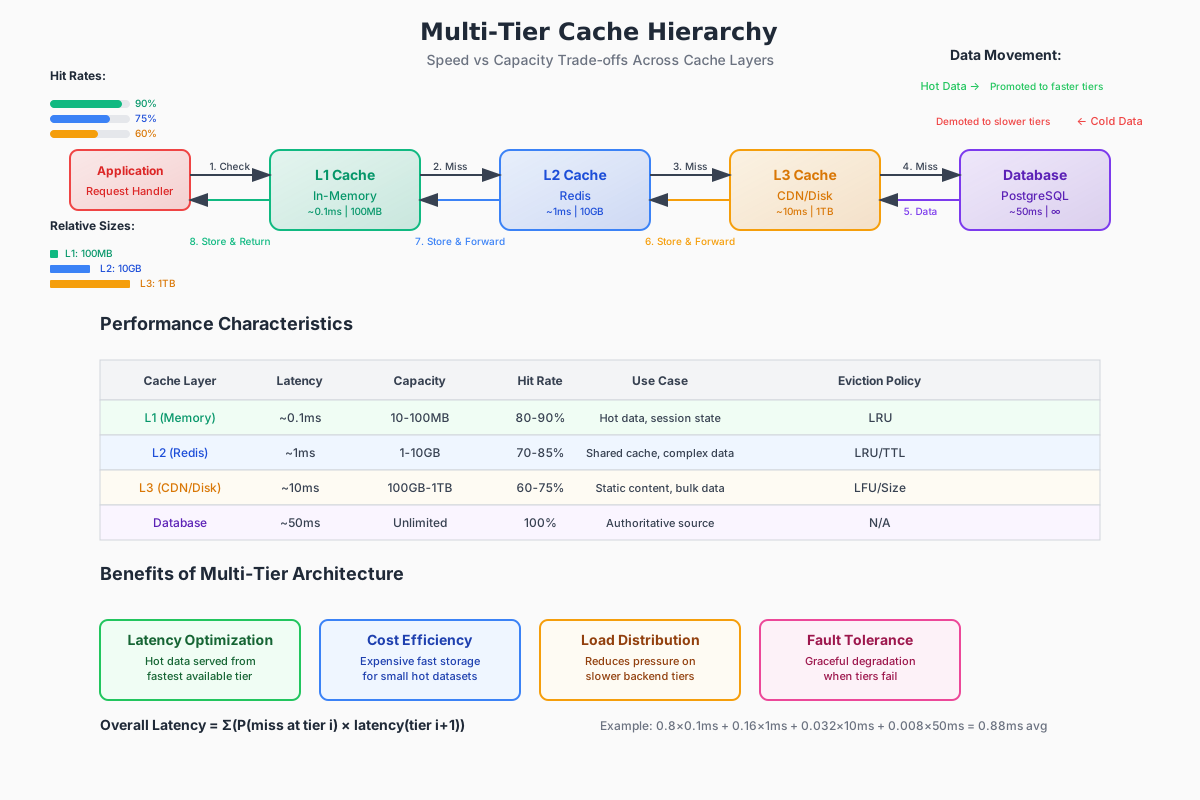
L1 (local) → L2 (distributed) → L3 (persistent) → Database
 Zoom
Zoom
Hot data gets promoted to faster tiers, cold data gets demoted.
Geographic Distribution
For global apps, caches must handle cross-region invalidation:
- Eventual consistency: Fast, but temporary inconsistencies across regions
- Strong consistency: Slower, but guaranteed consistency
📖 Further Reading: These patterns deserve dedicated posts. I'll cover advanced implementations in future articles.
Inconsistency Budget: Treat Cache Divergence Like an SLO
Think of cache inconsistency the way we think of latency or availability: as an operational quantity we can measure, budget, and improve. Instead of chasing a single hit-rate target, we should give each feature an explicit tolerance for staleness, measure how often we exceed that tolerance, and operate to keep the metric within an agreed budget. Doing so converts an abstract engineering worry into a repeatable process that the business can reason about.
Start by Naming What We Are Protecting
To do this. begin with a short list of concrete user journeys or features and write one clear sentence for each that states how much staleness is acceptable and why. For example, we might document that the public-facing user profile page may show values up to five seconds old because small display inconsistencies do not break business logic, whereas account balances must always reflect the canonical source.
Attach a short rationale to each entry — user annoyance, revenue risk, or regulatory exposure — and get product or legal sign-off. This step makes trade-offs explicit and prevents ad-hoc decisions later.
Measure the Signals That Let Us Reason Quantitatively
To make the budget useful we need three observable inputs.
- First, measure the update rate for the feature , which is simply how often the canonical data changes per second for the key-group we care about.
- Second, measure read demand , the number of reads per second that the feature receives.
- Third, measure or estimate the stale window , which is the duration after a write during which reads may still return the old value — this can be TTL, invalidation propagation delay, or duration of an asynchronous flush.
Then we can instrument the write and read paths to emit these metrics and capture timestamps so we can reason about end-to-end invalidation latency.
Use a Simple Model to Set Expectations — But Treat It As a Sanity Check
A first-order approximation converts those inputs into an expected stale fraction. A common shorthand is:
expected_stale_fraction ≈ min(1, u × T)
This formula gives a quick intuition: if updates are frequent and the stale window is long, a larger portion of reads will see stale data.
For example, if updates occur once every 10 seconds () and the stale window is 5 seconds, then , so roughly half of reads might be stale under uniform assumptions.
Treat this as a starting point — real traffic skews, hot keys, and burstiness will change the outcome — but the model helps us decide whether to accept the current design or invest in improvements.
The Practical Levers We can Pull - And What They Cost
If the expected staleness exceeds the budget, we can act along four pragmatic axes. Each adjustment has trade-offs, and we should pick the one that best maps to our business risk.
-
First, reduce — make the stale window shorter. We do this by invalidating caches synchronously on write, pushing invalidations over a pub/sub system, or shortening TTLs. The cost is higher miss rates and additional load on the backing store; we should plan capacity accordingly.
-
Second, reduce the effective update impact by batching, coalescing, or debouncing writes so they happen less frequently. This can be effective for noisy update patterns (for example, frequent UI “save” actions) but it can change the semantics of writes and increase write latency for some clients.
-
Third, reduce the number of reads that must rely on cached values by routing critical reads straight to the authoritative store or adding a validation step (for example, compare a version number and fall back to single-source reads when versions do not match). This preserves correctness for critical paths while still benefiting from caches for less-sensitive paths, at the cost of increased latency and cost for the guarded reads.
-
Fourth, increase the budget only when stakeholders accept the additional risk and we compensate with monitoring or reconciliation processes. This may be appropriate for clearly low-risk features where saving cost or reducing latency is a higher priority than absolute correctness.
How to Operationalize the Budget
Turn the inconsistency budget into SLIs and SLOs like we would for latency. We should define a staleness SLI (for instance, the percentage of sampled reads that returned a value different from the canonical source over the last 10 minutes) and an SLO that represents the allowed budget. For this, instrument the system to sample a small fraction of reads and compare those values against the authoritative store to compute a staleness ratio.
A practical starting point for sampling might be 0.1%–1% of reads, tuned to the traffic and backend capacity; increase sampling during incidents. Feed these metrics into dashboards that break down staleness by feature, hot keys, and region so we can quickly identify whether a spike is a local misconfiguration or a global service failure. Alert when the measured staleness approaches or exceeds the SLO, and keep a runbook that maps common staleness spikes to likely causes (deploys, message bus delays, configuration changes).
Inconsistency Budget Implementation:
1import random
2import time
3from dataclasses import dataclass
4from typing import Dict, Optional
5
6@dataclass
7class StalenessConfig:
8    feature_name: str
9    max_staleness_seconds: float
10    sample_rate: float  # 0.01 = 1% sampling
11    slo_threshold: float  # 0.05 = 5% staleness budget
12
13class StalenessMonitor:
14    def __init__(self):
15        self.configs: Dict[str, StalenessConfig] = {}
16        self.metrics: Dict[str, dict] = {}
17
18    def register_feature(self, config: StalenessConfig):
19        """Register a feature with its staleness budget"""
20        self.configs[config.feature_name] = config
21        self.metrics[config.feature_name] = {
22            "total_reads": 0,
23            "stale_reads": 0,
24            "violations": 0
25        }
26
27    def check_staleness(self, feature: str, cache_value: dict,
28                       authoritative_value: dict) -> bool:
29        """Sample and measure staleness for a feature"""
30        config = self.configs.get(feature)
31        if not config:
32            return False
33
34        # Sample based on configured rate
35        if random.random() > config.sample_rate:
36            return False
37
38        metrics = self.metrics[feature]
39        metrics["total_reads"] += 1
40
41        # Check if cached value is stale
42        cache_timestamp = cache_value.get("timestamp", 0)
43        auth_timestamp = authoritative_value.get("timestamp", time.time())
44
45        staleness = auth_timestamp - cache_timestamp
46        is_stale = staleness > config.max_staleness_seconds
47
48        if is_stale:
49            metrics["stale_reads"] += 1
50
51        # Check if we're violating SLO
52        if metrics["total_reads"] > 0:
53            staleness_ratio = metrics["stale_reads"] / metrics["total_reads"]
54            if staleness_ratio > config.slo_threshold:
55                metrics["violations"] += 1
56                self._alert_slo_violation(feature, staleness_ratio)
57
58        return is_stale
59
60    def _alert_slo_violation(self, feature: str, current_ratio: float):
61        """Alert when staleness budget is exceeded"""
62        config = self.configs[feature]
63        print(f"ALERT: {feature} staleness SLO violated!")
64        print(f"Current: {current_ratio:.3f}, Budget: {config.slo_threshold:.3f}")
65
66    def get_staleness_metrics(self, feature: str) -> dict:
67        """Get current staleness metrics for a feature"""
68        metrics = self.metrics.get(feature, {})
69        if metrics.get("total_reads", 0) == 0:
70            return {"staleness_ratio": 0.0, "violations": 0}
71
72        staleness_ratio = metrics["stale_reads"] / metrics["total_reads"]
73        return {
74            "staleness_ratio": staleness_ratio,
75            "total_reads": metrics["total_reads"],
76            "stale_reads": metrics["stale_reads"],
77            "violations": metrics["violations"]
78        }
79
80monitor = StalenessMonitor() # Usage example
81
82monitor.register_feature(StalenessConfig(
83    feature_name="user_profile",
84    max_staleness_seconds=30.0,  # 30 seconds max staleness
85    sample_rate=0.01,            # Sample 1% of reads
86    slo_threshold=0.05           # 5% staleness budget
87))
88
89monitor.register_feature(StalenessConfig(
90    feature_name="account_balance",
91    max_staleness_seconds=1.0,   # 1 second max staleness
92    sample_rate=0.1,             # Sample 10% of reads (critical)
93    slo_threshold=0.01           # 1% staleness budget (strict)
94))
95
96def get_user_profile(user_id: str):
97    cache_value = cache.get(f"profile:{user_id}")
98    if cache_value:
99        # Sample and check staleness
100        auth_value = {"timestamp": time.time()}  # From DB
101        monitor.check_staleness("user_profile", cache_value, auth_value)
102        return cache_value
103
104    # Cache miss - load from database
105 return load_from_database(user_id)1import random
2import time
3from dataclasses import dataclass
4from typing import Dict, Optional
5
6@dataclass
7class StalenessConfig:
8 feature_name: str
9 max_staleness_seconds: float
10 sample_rate: float # 0.01 = 1% sampling
11 slo_threshold: float # 0.05 = 5% staleness budget
12
13class StalenessMonitor:
14 def __init__(self):
15 self.configs: Dict[str, StalenessConfig] = {}
16 self.metrics: Dict[str, dict] = {}
17
18 def register_feature(self, config: StalenessConfig):
19 """Register a feature with its staleness budget"""
20 self.configs[config.feature_name] = config
21 self.metrics[config.feature_name] = {
22 "total_reads": 0,
23 "stale_reads": 0,
24 "violations": 0
25 }
26
27 def check_staleness(self, feature: str, cache_value: dict,
28 authoritative_value: dict) -> bool:
29 """Sample and measure staleness for a feature"""
30 config = self.configs.get(feature)
31 if not config:
32 return False
33
34 # Sample based on configured rate
35 if random.random() > config.sample_rate:
36 return False
37
38 metrics = self.metrics[feature]
39 metrics["total_reads"] += 1
40
41 # Check if cached value is stale
42 cache_timestamp = cache_value.get("timestamp", 0)
43 auth_timestamp = authoritative_value.get("timestamp", time.time())
44
45 staleness = auth_timestamp - cache_timestamp
46 is_stale = staleness > config.max_staleness_seconds
47
48 if is_stale:
49 metrics["stale_reads"] += 1
50
51 # Check if we're violating SLO
52 if metrics["total_reads"] > 0:
53 staleness_ratio = metrics["stale_reads"] / metrics["total_reads"]
54 if staleness_ratio > config.slo_threshold:
55 metrics["violations"] += 1
56 self._alert_slo_violation(feature, staleness_ratio)
57
58 return is_stale
59
60 def _alert_slo_violation(self, feature: str, current_ratio: float):
61 """Alert when staleness budget is exceeded"""
62 config = self.configs[feature]
63 print(f"ALERT: {feature} staleness SLO violated!")
64 print(f"Current: {current_ratio:.3f}, Budget: {config.slo_threshold:.3f}")
65
66 def get_staleness_metrics(self, feature: str) -> dict:
67 """Get current staleness metrics for a feature"""
68 metrics = self.metrics.get(feature, {})
69 if metrics.get("total_reads", 0) == 0:
70 return {"staleness_ratio": 0.0, "violations": 0}
71
72 staleness_ratio = metrics["stale_reads"] / metrics["total_reads"]
73 return {
74 "staleness_ratio": staleness_ratio,
75 "total_reads": metrics["total_reads"],
76 "stale_reads": metrics["stale_reads"],
77 "violations": metrics["violations"]
78 }
79
80monitor = StalenessMonitor() # Usage example
81
82monitor.register_feature(StalenessConfig(
83 feature_name="user_profile",
84 max_staleness_seconds=30.0, # 30 seconds max staleness
85 sample_rate=0.01, # Sample 1% of reads
86 slo_threshold=0.05 # 5% staleness budget
87))
88
89monitor.register_feature(StalenessConfig(
90 feature_name="account_balance",
91 max_staleness_seconds=1.0, # 1 second max staleness
92 sample_rate=0.1, # Sample 10% of reads (critical)
93 slo_threshold=0.01 # 1% staleness budget (strict)
94))
95
96def get_user_profile(user_id: str):
97 cache_value = cache.get(f"profile:{user_id}")
98 if cache_value:
99 # Sample and check staleness
100 auth_value = {"timestamp": time.time()} # From DB
101 monitor.check_staleness("user_profile", cache_value, auth_value)
102 return cache_value
103
104 # Cache miss - load from database
105 return load_from_database(user_id)Patterns to Evaluate
We will choose between patterns not because one is universally best, but because each maps to different guarantees and failure modes.
-
Invalidate-on-write means deleting the cache key when we write to the canonical store. It is simple and avoids many ordering headaches. The downside is a short period of increased load: immediately after invalidation many clients will miss and hit the backing store.
-
Double-write means updating both the backing store and the cache in the write path. When ordering is guaranteed and retries are solid, this keeps the cache fresh with small staleness. The operational risk is partial failure modes - if the database write succeeds and the cache write fails, or if the cache is updated before the database write completes, we can end up with inconsistent state unless we add idempotency and compensating logic.
-
Read-through and write-through patterns push the population and propagation logic into the cache implementation, simplifying application code. They tend to be easy to adopt but can increase write latency because writes wait for the backing store. Write-behind improves write latency by flushing asynchronously from the cache to the store, but it introduces durability risk: if a cache node crashes before flushing, data can be lost unless we use a durable queue.
-
Event-driven invalidation (for example, CDC feeding a pub/sub channel that services subscribe to) gives low-latency, cross-service invalidations at scale. The trade-off is operational complexity: ordering, duplication, and replay semantics must be handled, and we need visibility into the event pipeline.
What to Measure, and Why It Matters
We must not stop at hit rate. The most important metrics for running caches safely are the ones that tell us about correctness and operational health. We need to track staleness ratio per feature as our primary SLI; measure eviction rate and eviction churn to understand whether the cache is properly sized; measure the miss penalty — how much latency and load a miss imposes on the backing store — so we know the true cost of expiration choices.
Correlate traces so that when we see a stale read we can link it to the write that should have invalidated it; version numbers or trace identifiers make that correlation practical.
Production Considerations
Moving to production introduces operational challenges that require systematic approaches.
Debugging Cache Issues
Common debug workflow:
- Check hit/miss rates for affected keys
- Trace invalidation events - did the cache get the update signal?
- Verify TTL behavior - are entries expiring as expected?
- Monitor for hot key patterns - is one key overwhelming the system?
1# Simple debug helper
2def debug_cache_key(cache, key):
3    info = {
4        'exists': cache.exists(key),
5        'ttl_remaining': cache.ttl(key),
6        'size_bytes': cache.memory_usage(key),
7        'last_accessed': cache.object_info(key).get('idle_time')
8    }
9 print(f"Key '{key}': {info}")1# Simple debug helper
2def debug_cache_key(cache, key):
3 info = {
4 'exists': cache.exists(key),
5 'ttl_remaining': cache.ttl(key),
6 'size_bytes': cache.memory_usage(key),
7 'last_accessed': cache.object_info(key).get('idle_time')
8 }
9 print(f"Key '{key}': {info}")Capacity Planning
Monitor these key metrics:
- Memory utilization: Keep below 80% to avoid eviction thrashing
- Hit rate trends: Declining hits may indicate insufficient capacity
- Eviction rate: High evictions suggest undersized cache
- Latency distribution: P99 latency spikes often precede capacity issues
Disaster Recovery
Cache failure response:
- Enable degraded mode: Route reads directly to database
- Prioritize critical data: Warm authentication and session caches first
- Control rebuild rate: Avoid overwhelming the database
- Monitor recovery: Track rebuild progress and database impact
💡 Tip: Design systems to gracefully degrade when caches fail. Users should see slower responses, not broken features.
Code
You can find complete implementations of above code snippets in my GitHub Repo - Cache Mechanics. Soon, I am planning to implement common cache patterns from scratch in the same repository.
Conclusion: Cache Wisely, or Pay Dearly
Caches don't lie out of malice; they lie because we ask them to. By budgeting inconsistency, measuring what matters, and simulating failures, you transform a liability into a superpower. Next time you are tempted by "just add a cache", remember: speed is cheap but consistency is earned.
If this resonates, share it with your team - I have seen it spark architecture overhauls. Let's build systems that don't just run fast, but run right.
If you enjoyed this post, subscribe to my newsletter where I dive deeper into the hidden engineering of databases and distributed systems.
👉 Subscribe to my newsletter The Main Thread to keep learning with me. Namaste!
The Main Thread
I write a weekly deep dive like this one on distributed systems and AI engineering. One issue every week, straight to your inbox.
References
Written by Anirudh Sharma
Published on October 05, 2025